

Top Features to Look For in the Best Gaming Keyboards
It might surprise you to learn that the tactile experience of a keyboard can significantly impact your gaming performance. When your keyboard is not up to par, those milliseconds of delay or lack of responsive feedback can be the difference between victory and defeat. In the world of gaming, where every detail counts, choosing a top-tier gaming keyboard becomes not just a matter of preference but a critical component of your gaming setup. This guide delves into the essential features that define the best gaming keyboards, helping you make an informed choice that enhances your gameplay and possibly, your win rates.
From keys that respond to the lightest touch to customizable backlighting for late-night gaming sessions, the variety of features available on gaming keyboards can be overwhelming. Brands like Corsair, Razer, and Logitech continually push the envelope with innovative features tailored for every type of gamer. Whether you’re a competitive eSports player or a casual fan of immersive RPGs, understanding which features matter most in a gaming keyboard can elevate your experience significantly.
Razer BlackWidow Elite
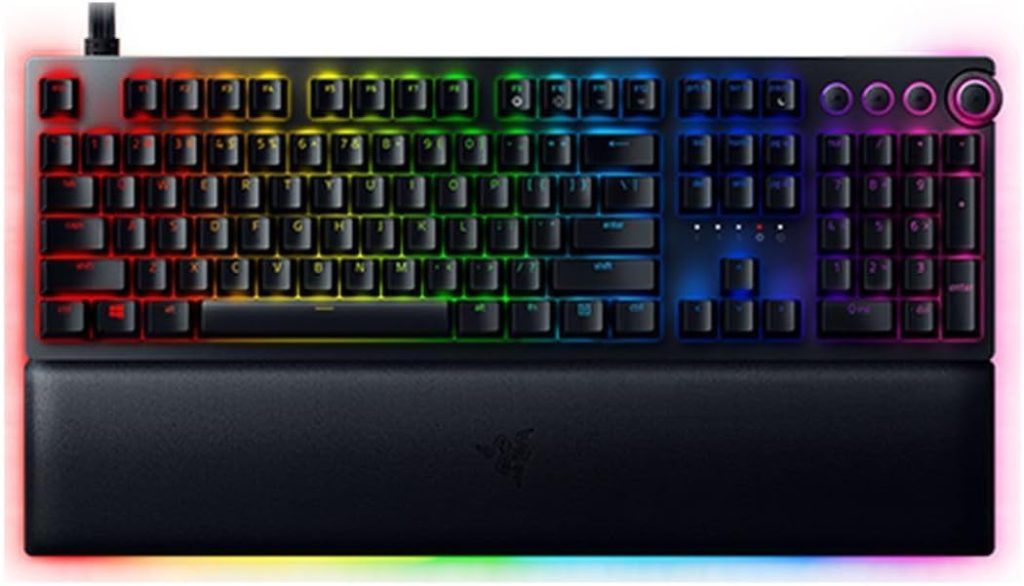
Starting with a classic, Razer’s BlackWidow Elite combines both tradition and innovation in its design. Ideal for those who appreciate mechanical switches and thoughtful ergonomics, this model stands out in both durability and performance.
Pros
- Includes Razer’s proprietary Orange Mechanical Switches known for their tactile feedback and quiet operation.
- Keycaps designed for durability, coated with a finish that prevents fading.
- Ergonomic wrist rest, providing comfort during long sessions.
- Customizable backlighting with Razer Chroma.
- Integrated media controls facilitate easy volume changes and track skipping.
- Supports Razer Hypershift, allowing for all keys and keypress combinations to be remapped.
Cons
- Higher price point compared to entry-level gaming keyboards.
- Uses a USB 2.0 instead of USB 3.0 for its passthrough.
Key Features & Benefits
The Razer BlackWidow Elite’s mechanical switches not only provide satisfying tactile feedback but are also engineered to withstand up to 80 million keystrokes, ensuring longevity. The quietness of the Orange switches makes this keyboard a great choice for both gaming and typing, preventing any disruptive clicking sounds. Another standout feature is its customizable Razer Chroma backlighting, which supports 16.8 million colors and a variety of effects that can be synced with gameplay or other Razer devices.
The inclusion of a plush leatherette wrist rest addresses the common issue of discomfort during prolonged gaming sessions, showcasing Razer’s attention to user experience. Additionally, the versatility offered by Razer Hypershift for customization differentiates this keyboard from more traditional models, allowing users to tailor their controls to their specific needs seamlessly.
Corsair K95 RGB Platinum
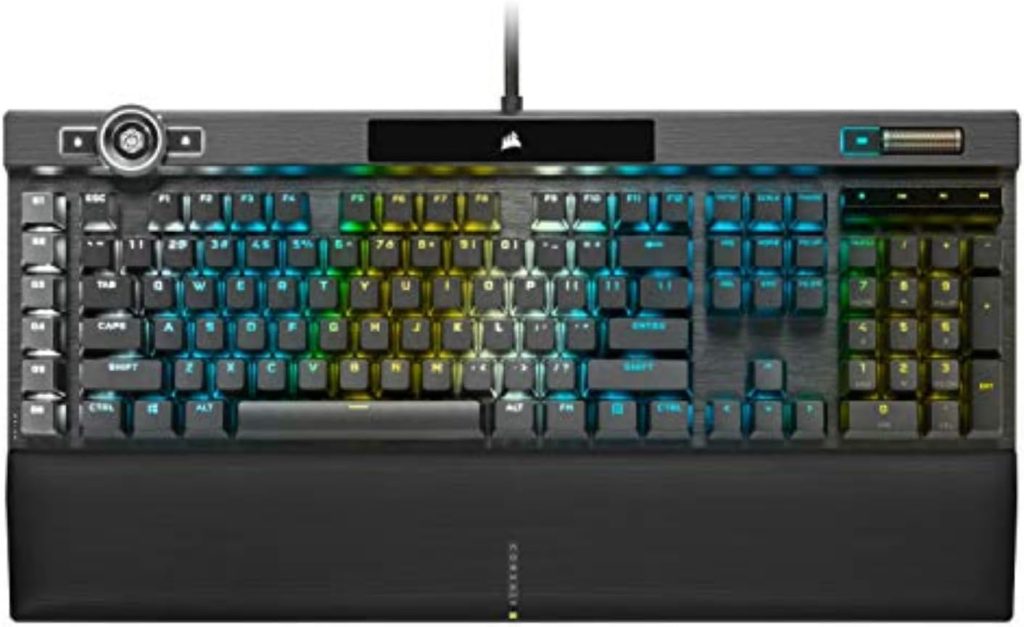
For gamers who leave nothing to chance, the Corsair K95 RGB Platinum is a tour de force in keyboard design. It is engineered for the ultimate performance with every keypress, designed to meet the demands of even the most intense gaming sessions.
Pros
- Aircraft-grade anodized brushed aluminum frame for superior durability.
- Cherry MX Speed RGB mechanical switches offer rapid response times.
- Dedicated macro keys and onboard memory to save gaming profiles directly to the keyboard.
- Dynamic multicolor per-key backlighting plus LightEdge provides exciting light shows.
- Detachable, dual-sided soft-touch wrist rest offers versatile comfort options.
- USB passthrough port for convenient peripheral connections.
Cons
- Somewhat bulky, which might not suit smaller desks.
- Premium price tag.
Key Features & Benefits
The frame of the Corsair K95 RGB Platinum is built to withstand the rigors of constant gaming and provides a sturdy foundation that feels secure under frenzied gameplay. Its speed switches actuate at just 1.2mm, making them some of the fastest available. This keyboard not only rapidly responds to inputs but also gives you the tactile feedback needed to adjust your style mid-game without second-guessing your tools.
Enhancements like per-key RGB backlighting and a 19-zone LightEdge across the top of the keyboard offer extensive customization, turning your gaming environment into a dynamic visual experience. The onboard memory allows you to save up to three gaming profiles, a beneficial feature for players who switch between different play styles or games. Corsair’s K95 RGB Platinum makes no compromises in providing a keyboard that matches ambitious performance with stunning aesthetics and personalization.
How to Choose the Right Top Features to Look For in the Best Gaming Keyboards
Choosing the right gaming keyboard is about knowing which features align most closely with your gaming needs. Comfort, performance, and customization sit at the core of the decision-making process, but let’s break down these categories into actionable insights:
- Performance: Look for keyboards with responsive mechanical switches that match your touch preference, whether tactile or smooth. Consider the actuation force and travel distance that might best suit your gaming style.
- Comfort: Keyboards with ergonomic designs, including adjustable stands, wrist rests, or contoured keycaps, can significantly enhance comfort, reducing the risk of strain over long gaming sessions.
- Customization: RGB lighting, programmable keys, and onboard memory for profile storage are crucial for adapting the keyboard to fit different games and personal preferences.
- Build Quality: A robust build not only extends the keyboard’s lifespan but also ensures stability during intense gaming sessions. Materials like aluminum or heavy-duty plastics are preferred for premium models.
- Additional Features: Consider whether you need features like USB passthroughs, dedicated media controls, or anti-ghosting capabilities, which can enhance both gaming performance and convenience.
FAQ
1. How important are mechanical switches in a gaming keyboard?
Mechanical switches are often considered superior for gaming due to their fast actuation times and durability, enhancing both the gaming experience and performance.
2. Can I use a gaming keyboard for everyday typing too?
Absolutely, gaming keyboards are designed for durability and comfort, which makes them excellent for everyday use as well.
3. What is anti-ghosting technology?
Anti-ghosting technology allows multiple keys to be registered simultaneously, crucial for gaming where complex key combinations are common.
4. What does RGB lighting add to a gaming keyboard?
RGB lighting adds not only aesthetic value but can also be useful for creating profiles for different games, indicating active functions, or just personalizing your gaming setup.
5. Are gaming keyboards compatible with all computers?
Most gaming keyboards connect via USB and are compatible with all major operating systems, but always check manufacturer specifications for compatibility.
6. How do I clean a gaming keyboard?
Use compressed air or a soft brush to remove debris from between keys, and use isopropyl alcohol with a lint-free cloth for deeper cleaning.
Conclusion
A great gaming keyboard can revolutionize your gaming experience, providing both the tactile feedback and the quick responses needed to perform at your best. When selecting a gaming keyboard, consider how the features discussed will match your specific gaming style and needs. Each gamer interacts with their keyboard differently, making it vital to select a model that feels like an extension of your own gaming intentions. Investing in a high-quality gaming keyboard is investing in your gaming future, enhancing not just your performance but also your overall engagement and enjoyment. Consider your options carefully, and you’re likely to find a keyboard that not only meets but exceeds your expectations.